Your scale app is a data collection product. The fitness tracking is the wrapper they ship around it.
Every time you step on a Renpho, Xiaomi, or Wyze scale and open the app to pull your reading, that data goes somewhere. Usually to a server you have zero visibility into. Budget-friendly BLE smart scales are manufactured primarily in China, and their cloud infrastructure lives there too. You agreed to this when you tapped “Accept” on the terms of service screen that nobody reads. The data includes your weight, body fat estimate, muscle mass, metabolic age, and a half-dozen other body composition metrics collected on a daily or near-daily basis.
I wrote about the vendor cloud problem with smart scales a few weeks back, mostly from the “these numbers are kind of made up anyway” angle. But if your concern is less about accuracy and more about where your body data is actually going, there’s a concrete technical answer now. The BLE Scale Sync Home Assistant Garmin pipeline is exactly what it sounds like: an open-source bridge that reads your scale directly over Bluetooth at the hardware level, bypasses the vendor app entirely, and routes your measurements wherever you want them: Garmin Connect, Home Assistant, InfluxDB, Strava, or a webhook of your choosing.
This is a project worth knowing about. I haven’t personally built and run this bridge (my Wyze Scale Ultra isn’t even supported by it yet, which I’ll get to), but the documentation is solid, the community adoption is real, and the architecture is exactly what it sounds like. Here’s how it works and whether it’s worth your time.
What Is BLE Scale Sync and What Does It Actually Do?
The concept is simpler than the name suggests. Your scale broadcasts weight and body composition data over Bluetooth Low Energy. Normally, the vendor app intercepts that broadcast, does its calculations, and sends everything to the cloud. BLE Scale Sync sits between the scale and the cloud and just… doesn’t call the cloud.
It’s an open-source Node.js service that runs on any Linux machine with a Bluetooth adapter. Point it at your scale’s MAC address, configure which exporters you want, and it runs as a headless daemon, picking up readings whenever you step on the scale. No app open. No phone nearby. Just the scale and your local server.
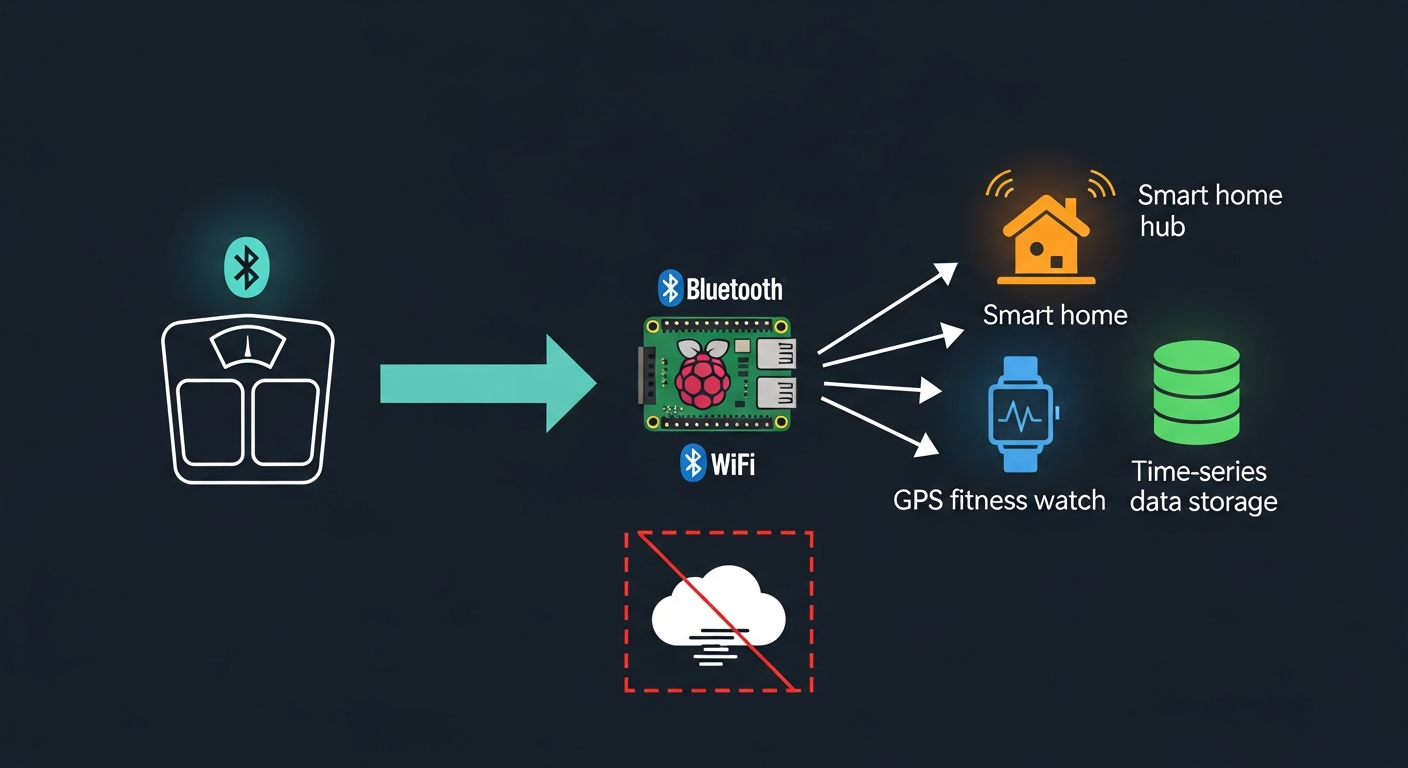
The project, maintained by KristianP26 on GitHub under a GPL-3.0 license, currently supports 26 BLE protocol adapters covering most of the major budget scale brands. The exporters list is what makes it genuinely useful:
- Garmin Connect (full 10-metric body composition sync, not just weight)
- Home Assistant via MQTT auto-discovery (creates 10 sensors grouped under one device)
- InfluxDB v2 (direct write API, pairs with Grafana for time-series dashboards)
- Strava (OAuth 2.0)
- Webhooks (HTTP POST to n8n, Make, Zapier, or any custom endpoint)
- Local CSV and JSONL files
- Ntfy push notifications
- Intervals.icu (training load, fitness, and fatigue metrics that all factor in body weight)
- Runalyze (pace and performance analytics that incorporate body weight in efficiency models)
- Wger (open-source workout tracker; body weight is a tracked metric)
- Telegram (instant message notification with your weight reading the moment you step off the scale)
Project home is blescalesync.dev and the GitHub repo is KristianP26/ble-scale-sync.
What Does This Actually Replace? (And Why the Current Cloud Chain Is Worse Than You Think)
Before this existed, getting full body composition data from a budget BLE scale into Garmin Connect required a cloud-chain that would make a Rube Goldberg fan proud. Step on scale. Open vendor app. Wait for vendor cloud to receive the sync. Connect to MyFitnessPal. Wait for MFP to receive the sync. Wait for Garmin to pull from MFP.
There’s a specific detail nobody talks about here: the MyFitnessPal bridge to Garmin only syncs weight. Not body fat percentage. Not muscle mass. Not visceral fat index. Just the one number. So if you’re using a Renpho or Xiaomi scale for its full body composition suite and you thought Garmin was getting all of it, it probably isn’t.
BLE Scale Sync syncs all 10 metrics directly to Garmin. Weight, body fat percentage, water percentage, muscle mass, bone mass, BMI, BMR, visceral fat, metabolic age, and impedance. The Garmin exporter uses the garminconnect Python library (yes, Python is a separate dependency from the Node.js runtime; more on that in the setup section).
If I’m being honest, the other thing that bothers me about the cloud-chain approach is fragility. Any one of those three services changing their API or their terms of service breaks the chain silently. You don’t get an error message. Your data just stops showing up in Garmin one day and you have no idea when it stopped. A local pipeline doesn’t have that problem. It either works or it visibly doesn’t.
Paid alternative: smartscalesync.com charges $18.99/year for a similar cloud-to-Garmin bridge. It syncs full body composition, which is more than MFP does. But it’s still a cloud service you’re trusting with your data, and it doesn’t integrate with Home Assistant or InfluxDB. BLE Scale Sync is free, local, and does all three.
How Does BLE Scale Sync Compare to the Other Options?
If you’ve spent any time researching how to get smart scale data into Garmin without the vendor cloud, you’ve probably come across a handful of tools that promise something similar. Some are paid cloud bridges. Some are single-brand CLI scripts. Some are brand-new integrations with limited testing behind them. Here’s how the main options compare, based on what each tool’s documentation and community threads actually say.
| Tool | Scale support | Garmin / HA / InfluxDB | Local or cloud | HA add-on | Cost | Status |
|---|---|---|---|---|---|---|
| BLE Scale Sync | 26 brands (multi-brand) | All three | Local | Yes (native) | Free | Active |
| Renpho HA Integration | Renpho only | HA only | Local | Yes (HACS) | Free | Active (May 2026) |
| export2garmin | Renpho / select brands | Garmin only | Local | No | Free | Varies |
| RenphoGarminSync-CLI | Renpho only | Garmin only | Local | No | Free | Varies |
| smartscalesync.com | Multi-brand | Garmin only | Cloud | No | $18.99/yr | Active |
| WeightSyncr | Via Apple Health | Garmin only (weight only) | Cloud | No | Paid | Active |
The combination of free, local, and multi-exporter is what separates BLE Scale Sync from everything else on this list. The paid options like smartscalesync.com and WeightSyncr work, but they route your data through servers you don’t control, and WeightSyncr only syncs weight, not the full body composition suite you’re probably trying to get into Garmin. The single-brand options (export2garmin, RenphoGarminSync-CLI, the newer Renpho HA Integration via HACS) are solid choices if you only have a Renpho and need HA sensors or Garmin sync in isolation. For anyone who wants multiple export destinations, multiple scale brands, and data that stays local, BLE Scale Sync is the clear pick on this list.
Which Scales Actually Work With It?
This is where I have to be honest in a way the other posts covering this project aren’t. Not every scale works. And some popular ones don’t work at all yet.
Currently supported brands (26 protocol adapters as of v1.19.0, June 2026):
Xiaomi (Mi Scale 2), Renpho (Elis 1, FITINDEX, Sencor, QN-Scale variants), Eufy (P2 Pro T9149), Yunmai, Beurer, Sanitas, Medisana, 1byone, Soehnle, Active Era, Senssun (not Model B), MGB (Swan, Icomon, YG), Digoo, Excelvan, Trisa, ADE, Hoffen, Hesley, Inlife, Exingtech, and scales that implement the standard Bluetooth BCS/WSS GATT specification.
Not supported:
- Wyze Scale Ultra: not in the supported list. This is the scale I use personally, and it matters to flag because a lot of people land on this topic specifically because they have a Wyze scale and want it talking to Garmin. That path doesn’t exist yet through BLE Scale Sync. Your current options with a Wyze scale remain the cloud chain through MyFitnessPal or third-party apps. If you want to vote for Wyze support, the GitHub issues tracker is the right place.
If you’re buying a new scale specifically for local sync, the Renpho Elis 1 is the move. 400-lb capacity, confirmed supported.
- Senssun Model B: separate firmware, not compatible with the standard Senssun adapter.
- Some Renpho ES-CS20M units with broadcast-only firmware have limited body comp calculation.
A few caveats on the supported list: Soehnle and some Sanitas and Beurer models require you to create a user slot in the manufacturer’s app before you can go app-free. You set it up once, and then you never open the app again. Standard GATT scales need you to manually select your user profile before each measurement. Minor friction, but worth knowing.
What Hardware Do You Need?
Minimal. Scarily minimal, actually.
The recommended setup is a Raspberry Pi Zero 2W, which runs about 15 euros and draws 0.4W at idle. It has Bluetooth built in, it runs Linux, and it can handle BLE Scale Sync with room to spare. You tuck it somewhere near your scale, plug it in, forget about it.
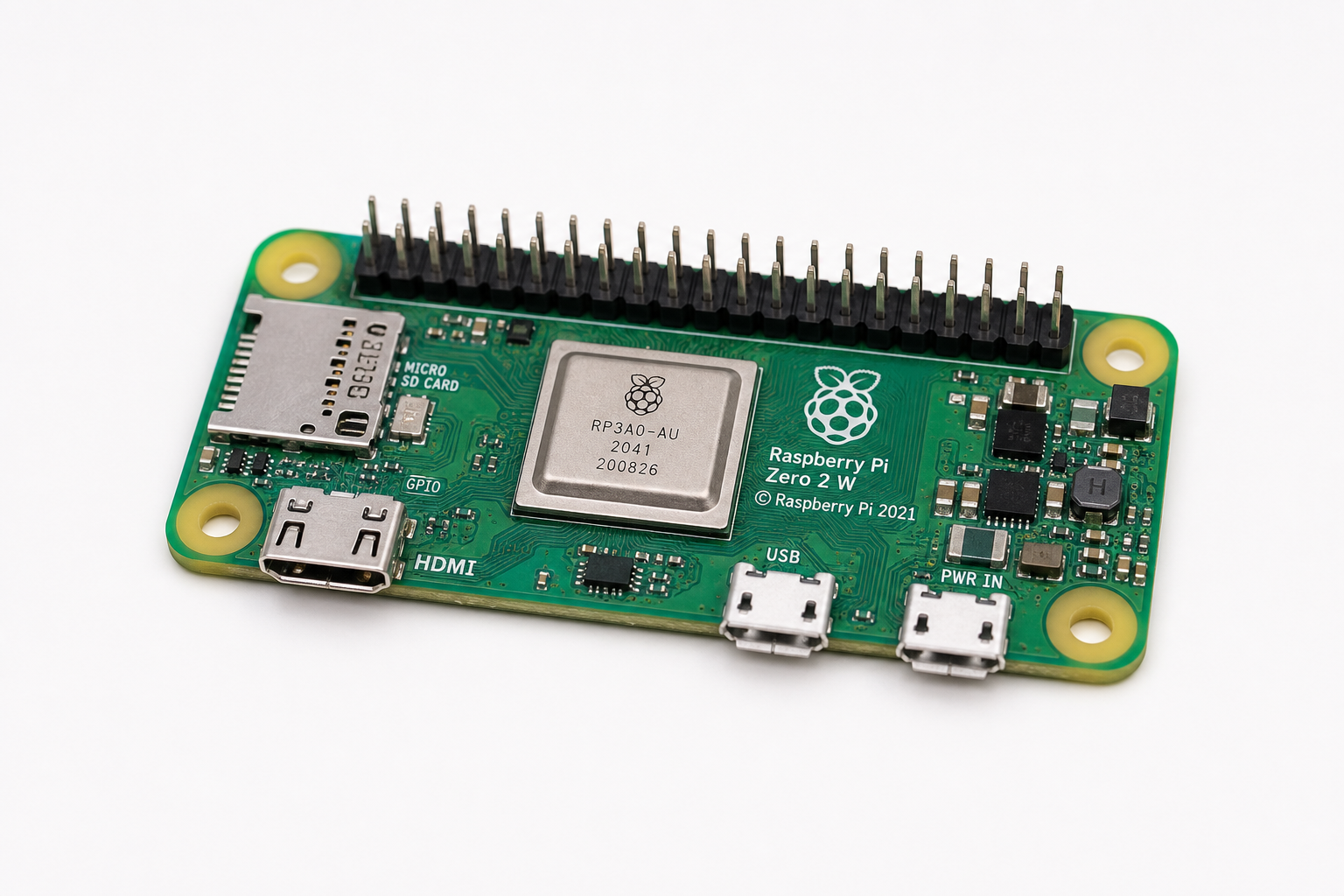
Hard warning before you order anything: the original Raspberry Pi Zero W (first generation, ARMv6) does not work. The esbuild binary that BLE Scale Sync depends on isn’t available for ARMv6. Buy the Zero 2W or any Pi 3, 4, or 5. Not the original Zero W.
Other options that work:
- Any Linux machine with a Bluetooth adapter (desktop, mini PC, existing home server)
- Docker on Linux or Raspberry Pi (requires BlueZ via D-Bus with
--network host) - macOS with Node.js and Xcode CLI tools installed
- Windows with Node.js and Visual Studio Build Tools (C++ workload)
If you don’t have a home server yet and want the full picture on building one for this and other self-hosted projects, the home server setup guide covers hardware selection, Ubuntu Server install, and Docker. If you want to go deeper on the OS side, I put together a comparison of Proxmox, TrueNAS, and Unraid that covers which one fits which use case.
ESP32 alternative (~8 euros): If your server lives in a different room from your scale and you don’t want to run BLE over that distance, an ESP32 placed near the scale can act as a Bluetooth proxy, relaying BLE data over WiFi and MQTT to the main server. The server needs no Bluetooth adapter at all in this configuration. The ESPHome proxy mode is marked experimental in the current release (Phase 1, broadcast-only), but it works for basic use cases.
How to Set It Up (Three Paths)
Pick the path that matches your setup.
Path 1: Home Assistant Add-on (Easiest)
This is the one-click option if you’re already running Home Assistant OS or a Supervised install. Container and Core installs don’t support the add-on system, so skip to Path 2 or 3 if that’s you.
Go to Settings > Add-ons > Add-on Store. Click the three-dot menu in the top right and add this repository URL:
https://github.com/KristianP26/ble-scale-syncReload the store, find BLE Scale Sync, click install. The add-on auto-detects the Mosquitto MQTT broker add-on through the HA Supervisor API, so no manual MQTT credentials are needed. Configure your scale’s MAC address and user profile in the add-on config panel and start it. Done.
To find your scale’s MAC address, the project includes a BLE diagnostic tool. From the add-on’s log tab, you can run it in discovery mode and it will list nearby BLE devices.
Path 2: Docker on Raspberry Pi or Linux
# Pull the image and run with host networking (required for BlueZ BLE access)
docker run -d \
  --name ble-scale-sync \
  --network host \
  --restart unless-stopped \
  -v /path/to/your/config.yaml:/app/config.yaml \
  ghcr.io/kristianp26/ble-scale-sync:latest
You’ll need a config.yaml file before running this. Use Path 3’s setup wizard to generate one, then copy it to the path you’re mounting. Docker on macOS and Windows doesn’t have native access to BlueZ, so this path is Linux and Raspberry Pi only.
Path 3: Native Node.js (All Platforms)
You’ll need Node.js v22 or newer. On Linux and Raspberry Pi, you also need a few system packages first:
# Install BLE system dependencies (Debian/Ubuntu/Raspberry Pi OS)
sudo apt install bluetooth bluez libbluetooth-dev libudev-dev build-essential

# Clone and install
git clone https://github.com/KristianP26/ble-scale-sync.git
cd ble-scale-sync
npm install

# Grant the node binary raw Bluetooth access (required on Linux, run once)
sudo setcap cap_net_raw+eip $(eval readlink -f $(which node))
Then run the interactive setup wizard:
npm run setupThe wizard walks you through selecting your scale brand, entering the MAC address, configuring user profiles, and enabling exporters. It generates a config.yaml at the end. Once you have that:
# Start as a daemon
npm start
For Windows, you need Visual Studio Build Tools with the C++ workload installed before npm install. On macOS, run xcode-select --install first.
Garmin setup note: The Garmin exporter requires Python 3.9+ in addition to Node.js. You’ll install the Python dependencies from a separate requirements.txt in the garmin subdirectory and run an interactive authentication step on first use. Tokens are cached in ~/.garmin_tokens after that. One gotcha: Garmin may block authentication attempts from cloud IP ranges or VPN exits. If the auth step fails, make sure you’re connecting from your home IP directly.
BLE Scale Sync Home Assistant Garmin and InfluxDB: Exporter Setup
Once BLE Scale Sync is running, the exporter configuration lives in your config.yaml. Here’s what each destination looks like in practice.
Garmin Connect: Configure your Garmin account email and password. After the first interactive auth, tokens are cached and the process is silent. All 10 body composition metrics sync directly to Garmin Connect, not just weight. This is the part that can’t be replicated through the MFP bridge.
Home Assistant via MQTT: Point the exporter at your MQTT broker (mqtt://your-ha-ip:1883 or mqtts:// for TLS). BLE Scale Sync uses MQTT auto-discovery, so all 10 sensors appear automatically in HA, grouped under one device with availability tracking. You don’t need to manually create any entities. Once those sensors exist, you can build whatever you want on top of them in your Home Assistant dashboard.
InfluxDB v2: Provide the URL, a write-access API token, your org name, and the bucket you want data written to. Measurements land in the body_composition measurement by default. If you’re already running Grafana connected to InfluxDB, you’ll have time-series body composition charts in about 10 minutes.
Webhooks: Configure an HTTP POST endpoint and BLE Scale Sync sends a JSON payload with every reading. Point it at an n8n workflow, a Make scenario, a custom API, whatever. Good for things like “text me when my weight drops below X” or “log to a Google Sheet on every reading.”
Newer exporters (v1.19.0+): Four additional export destinations arrived with the v1.19.0 release and aren’t documented in older guides. Intervals.icu receives body weight data and feeds it into training stress, fitness, and fatigue calculations for athletes tracking form and recovery. Runalyze incorporates body weight into pace efficiency and performance scoring. Wger logs body weight as a tracked metric in its open-source workout database. Telegram sends an instant message with your weight reading the moment you step off the scale.
For those of you who care about the data-ownership angle and want to understand what these devices are actually collecting alongside your body data, the companion post on wearable data and the big guy covers that in more detail.
So Who Should Actually Set This Up?
The honest answer: people who already have some home lab going and don’t mind 30 to 45 minutes of initial configuration.
If you have a Raspberry Pi sitting in a drawer, a home server, or an existing Home Assistant setup, this is a genuinely useful addition. It’s not complex once you have the pieces. The setup wizard does most of the heavy lifting. After the first run, it’s invisible.
If your relationship with technology is “I want my scale to sync to my phone and that’s it,” this is overkill. The vendor apps work fine for that. Nobody is judging you for using the Renpho app.
The use case this really solves is the person who’s annoyed that their Garmin only gets weight from their smart scale, or who wants to see body composition trends alongside other health metrics in a self-hosted dashboard, or who just doesn’t love the idea of a Chinese cloud service holding years of daily body composition measurements. For that person, BLE Scale Sync is exactly the right tool.
The real pro tip from this post: if you’re buying a new scale specifically to get local Garmin sync working, get a Renpho Elis 1 or one of the confirmed-supported Xiaomi or Eufy models. Don’t buy a Wyze Scale Ultra expecting local BLE sync to exist. It doesn’t yet. (I say this as someone currently using a Wyze Scale Ultra and watching the GitHub issues tracker with slightly too much investment.) 😄
BLE Scale Sync Not Working? Common Fixes
Most failures trace back to one of five root causes. Here’s what to check first.
“No scale found” in logs. Step on the scale while the discovery scan is running, since most BLE scales only broadcast when they detect weight. Check that your MAC address uses colon format (AA:BB:CC:DD:EE:FF), not hyphens. On Linux, run hciconfig to confirm the Bluetooth adapter is visible to the host system.
Garmin auth blocked or failing. Garmin blocks authentication from cloud server IP ranges and common VPN exit nodes. Run the initial auth step from your home network. If you later move the service to a remote server, authenticate at home first and copy the token files over rather than trying to re-auth remotely.
Python 3.9 not found. The Garmin exporter requires Python 3.9 or newer, even when running BLE Scale Sync via the Node.js path. Install it via sudo apt install python3.9 on Debian/Ubuntu or brew install python@3.9 on macOS, then install the garmin subdirectory’s requirements.txt before trying the auth step.
Original Pi Zero W won’t run the service. The first-generation Pi Zero W uses an ARMv6 CPU that can’t run the esbuild binary BLE Scale Sync depends on. The service installs without error but crashes with SIGILL on startup. The fix is a Pi Zero 2W or any ARM64 device. There is no workaround on the ARMv6 side.
ESPHome proxy not forwarding readings. If you’re using an ESP32 as a Bluetooth proxy, it sends data via MQTT. Configure the ESP32 with your MQTT broker’s IP, port 1883, and credentials matching your Mosquitto config. A mismatch on any of those silently blocks the relay. If you’re running the HA Mosquitto add-on, the credentials are in its configuration panel.
garminconnect v0.3.0 breaking change (April 2026)
The garminconnect Python library released v0.3.0 on April 2, 2026, and removed the garth dependency used by previous auth flows. Saved token files from older installs are not compatible with v0.3.0’s native authentication engine. If the bridge was set up before April 2026 and Garmin uploads have stopped working, update the add-on or library to the latest version, delete any cached token files, and re-run the interactive Garmin authentication step. New tokens are stored at ~/.garminconnect/garmin_tokens.json.
For HA add-on users who need to edit config directly: the custom config path is /share/ble-scale-sync/config.yaml (enable custom config mode in the add-on settings first). The runtime config the add-on reads lives at /data/config.yaml and is regenerated from the shared path on each start.
Sources
- BLE Scale Sync GitHub Repository: KristianP26; GPL-3.0 license; project code and issues tracker
- BLE Scale Sync Getting Started Guide: official documentation for Node.js, Docker, and HA add-on installation
- BLE Scale Sync Exporters Documentation: configuration reference for Garmin, MQTT, InfluxDB, Strava, Webhooks, and local file exporters
- BLE Scale Sync Home Assistant Add-on Guide: HA OS/Supervised installation walkthrough
- BLE Scale Sync Supported Scales: full list of 25 supported protocol adapters with per-brand notes
- BLE Scale Sync Alternatives Comparison: project’s own comparison against cloud bridge options including smartscalesync.com
- Home Assistant Community Thread: BLE Scale Sync announcement: community reception thread, March 2026
- Smart Scales Lied to Me for Years (companion post): background on scale accuracy and vendor cloud concerns
- BLE Scale Sync Troubleshooting Guide: official troubleshooting reference covering common setup failures including BLE adapter issues, Garmin auth, ARMv6 incompatibility, and Bluetooth adapter troubleshooting
- garminconnect v0.3.0 Release Notes: April 2, 2026 release that removed the garth dependency and changed token storage to
~/.garminconnect/garmin_tokens.json - Renpho HA Integration (HACS): Renpho-only local BLE integration posted May 3, 2026; HA sensors only, no Garmin or InfluxDB export
Got a Scale? Tell Me What You’re Running
I’m curious which scale you’re using and whether you’ve tried any local-sync approach. Drop the model in the comments.
If your scale isn’t in the supported list, head to the BLE Scale Sync GitHub issues and request support. The developer is actively adding adapters and community demand directly drives what gets prioritized.
And if you set this up and get it running, I want to hear how it went, especially for anyone using the ESP32 proxy path. That whole “Bluetooth-over-WiFi relay” approach is clever and I’m keeping an eye on how it matures.