
I Built an AI That Handles Customer Support So Small Businesses Don’t Have To
Full disclosure up front: this post is about a product I built. Trigli is mine. I’m not pretending to be a neutral reviewer here, and I’m not going to insult your intelligence by hiding that fact.
What I am going to do is walk you through the actual problem that led me to build it, explain how the technology works, be honest about what it can and can’t do, and let you decide if it’s useful. If you walk away from this post understanding AI customer support better (even if you never sign up for anything), then I’ve done my job.
Cool? Cool.
The Problem: Small Businesses Are Drowning in Support Emails
Here’s a scenario I kept seeing over and over. A small business owner, maybe running an e-commerce store or a SaaS product, starts getting traction. Sales go up. And then the support emails start piling up.
At first you handle them yourself. You answer the same “where’s my order?” question fifteen times a day between actually running your business. Then you start falling behind. Replies take 48 hours instead of 4. Customers get frustrated. Reviews suffer.
The numbers back this up. According to Salesforce’s State of the Connected Customer report, 83% of customers expect to interact with someone immediately when they contact a company. Tidio’s research found that 62% of consumers would rather talk to a chatbot than wait 15 minutes for a human agent. People want fast answers, and small teams just can’t keep up.
So what do you do? You’ve got roughly three options:
Hire someone. A dedicated support person runs $3,000 to $4,000 a month at minimum, often more. For a business doing $10K-$20K in monthly revenue, that’s a huge chunk of your margin.
Use a help desk platform. Zendesk, Intercom, Freshdesk. These are legitimate tools, but they come with their own problems (more on that in a second).
Just… keep grinding. Answer emails at midnight. Miss some entirely. Apologize a lot. This is what most small business owners actually do, and it’s not sustainable.
I watched this cycle play out with people I knew, and honestly, I got tired of seeing it. So I started building something.
Why Zendesk and Intercom Aren’t the Answer for Small Teams
I want to be fair here. Zendesk and Intercom are good products. They handle support at massive scale, and if you’re running a 50-person support team, they’re probably the right call.
But for a three-person company? They’re overkill in the wrong direction.
Pricing scales with your pain. Intercom’s plans start around $39/seat/month, but the AI features that actually help you (Fin AI agent, for example) come with per-resolution fees. Every time the AI successfully handles a ticket, you pay. That pricing model means the better the AI works for you, the more you pay. Zendesk’s AI add-ons follow a similar pattern. For a small business trying to reduce costs, per-ticket pricing is the opposite of helpful.
Complexity tax. These platforms are built for enterprise teams with dedicated admins. The setup process involves ticket routing rules, automation workflows, SLA configurations, team hierarchies. A solo founder doesn’t need a ticket routing engine. They need their emails answered correctly and quickly.
You’re paying for features you’ll never use. Analytics dashboards built for VP-level reporting. Multi-department routing. Custom SLA tiers. If it’s just you and maybe one other person, 80% of those features are dead weight.
I’m not saying these tools are bad. I’m saying they’re solving a different problem than the one most small businesses actually have.
What I Built (and Why)
Trigli started with a simple idea: what if AI could handle the repetitive support emails that eat up most of a small business owner’s day, while staying out of the way for the stuff that actually needs a human?
Here’s what it does:
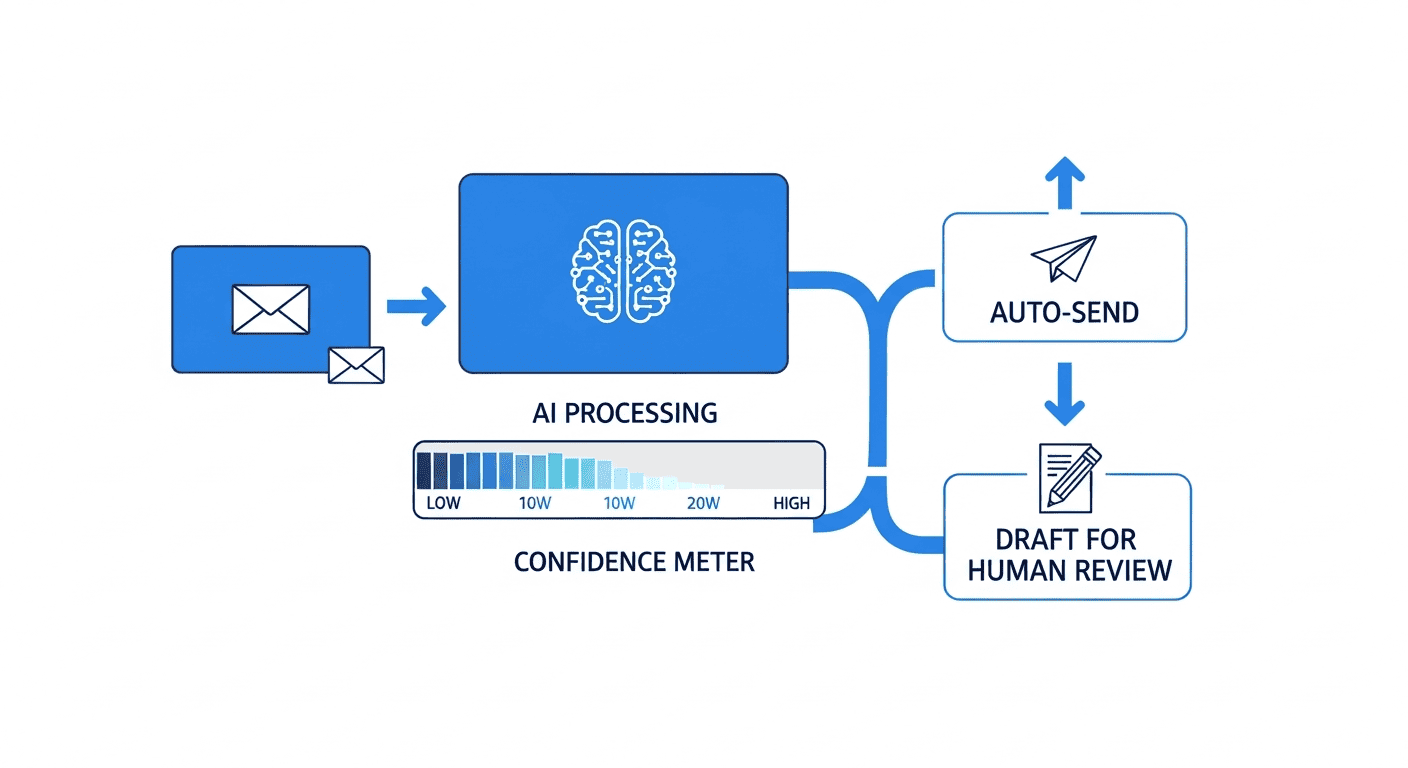
Email support on autopilot. Connect your Gmail, and Trigli reads incoming support emails. It generates reply drafts using AI, and each reply gets a confidence score. High-confidence replies (the “where’s my order?” and “what’s your return policy?” type questions) can auto-send. Low-confidence ones get saved as drafts for you to review before sending. You always have the final say.
Live chat that actually works. One line of JavaScript on your website adds a chat widget. Visitors can type questions and even upload screenshots. The AI can see images (it’s multimodal), so if someone sends a screenshot of an error message, it can actually read it and respond intelligently.

Your docs are the source of truth. This is the part I’m most particular about. Trigli’s AI only answers from your knowledge base. You upload PDFs, paste in text, import URLs. The AI pulls from that material and nothing else. If the answer isn’t in your docs, it says so instead of making something up. No hallucination. This was non-negotiable for me because an AI support tool that confidently gives wrong answers is worse than no AI at all.
Smart email classification. Not every email that hits your inbox is a support request. Trigli classifies incoming mail as support, spam, off-topic, or irrelevant. Spam gets filtered. Actual support emails get answered. Your newsletter subscriptions and vendor invoices get left alone.
Microsoft Teams notifications. When something needs your attention (a low-confidence reply, an angry customer, a question the AI can’t handle), you get pinged in Teams.
It learns from you. Trigli scans your existing sent emails to understand how you actually talk to customers. Your tone, your phrasing, the level of detail you typically include. Replies sound like you, not like a generic chatbot.
How the Confidence System Works
This is the part that makes it actually useful instead of just another chatbot.
Every reply Trigli generates gets a confidence score. If the AI found a clear, direct answer in your uploaded docs, the score is high and the reply can auto-send. If there’s any ambiguity, if the answer isn’t clearly covered in your knowledge base, or if the customer’s question is complex, the score drops and it gets flagged for your review.
You control the threshold. Want everything reviewed before it goes out? Set it to draft-only mode. Comfortable letting the AI handle the routine stuff? Raise the auto-send threshold. Most people start conservative and loosen up once they see the quality of the drafts. 🛠️
There’s also a web search fallback for time-sensitive questions. If someone asks about something that might have changed recently (shipping delays, service outages, current pricing), the system can check for up-to-date information before responding.
Who This Is Actually For
I built Trigli for specific types of businesses, and I think being honest about that matters more than trying to claim it works for everyone.
E-commerce stores are the sweet spot. You sell products online, and 70% of your support emails are the same ten questions about shipping, returns, sizing, and order status. An AI trained on your FAQ and policies can handle those all day long.
Small SaaS companies with a self-serve product. Your users have questions about features, billing, integrations, and onboarding. If you’ve got decent documentation, Trigli can field most of those.
Service businesses like agencies, consultants, or freelancers who get a lot of initial inquiries. “What are your rates?” “Do you offer X service?” “What’s your availability?” Those are highly repeatable and perfect for AI.
Who it’s NOT for: If you run a business where every support interaction is complex, emotional, or high-stakes (healthcare, legal, financial advising), AI shouldn’t be the first responder. Trigli can help triage and draft, but those conversations need a human touch from the start.
The Free Tier (Yes, Actually Free)
I wanted to make sure there was a way to try this without risk. The free plan gives you 50 email replies and 25 chat conversations per month at $0. No credit card required.
For a lot of very small businesses, that might actually be enough. If you’re getting 30-40 support emails a month and a handful of website chats, the free tier covers you entirely.
If you outgrow it, the Growth plan is $49/month for higher volume. The chat widget is an add-on at $29/month if you want it on top of email support. Flat pricing, no per-ticket fees, no surprise charges that scale with your success.
You can set the whole thing up in under five minutes. Connect Gmail, upload your knowledge base docs, and you’re running. I timed it.
What’s Coming Next
I want to be transparent about where Trigli is today versus where it’s headed.
Right now: Gmail integration, live chat, Microsoft Teams notifications, knowledge base from PDFs/text/URLs, confidence-based auto-send, email classification, reply history learning, web search fallback.
Coming soon: Outlook support is at the top of the list. I know a huge number of small businesses run on Microsoft’s ecosystem, and not having Outlook on day one is a gap. More CRM integrations are in the works too.
Longer term: Better analytics on what questions customers ask most (so you can improve your actual product), multi-language support, and deeper e-commerce platform integrations.
I’m building this as an active product, not a side project I’m going to abandon. If you check out the Trigli site and something’s missing that would make it useful for you, I genuinely want to hear about it.
What It Won’t Do (Being Honest Here)
No tool does everything, and pretending otherwise is a fast way to lose trust. Here’s where Trigli has real limitations:
It won’t replace your entire support team. If you have complex, multi-touch support conversations that require deep product knowledge and empathy, you still need humans. Trigli handles the repetitive volume so your team can focus on the hard stuff.
It’s only as good as your knowledge base. If your docs are incomplete or outdated, the AI’s answers will reflect that. Garbage in, garbage out. You need to maintain your knowledge base the same way you’d maintain an FAQ page.
Gmail only for now. If you’re on Outlook, Yahoo, or a custom mail setup, email integration isn’t available yet. Outlook is coming, but it’s not here today.
It won’t handle heated, emotional situations well. An angry customer who needs to feel heard isn’t going to be satisfied by an AI response, no matter how accurate it is. The confidence scoring helps here (those conversations typically get flagged for human review), but it’s worth understanding the limitation.
I’d rather you know all of this upfront than find out after you’ve set it up. 📋
Wrapping Up
I built Trigli because I saw small businesses burning hours on the same support emails every day, and the existing solutions were either too expensive or too complex for teams of one to five people. The goal was simple: handle the repetitive stuff with AI, flag the tricky stuff for humans, and charge a flat rate that doesn’t punish you for growing.
Is it perfect? No. Is it a useful tool that can save a small business owner real time every week? I genuinely believe so, and the free tier means you can find out without spending a dime.
If you run a small business and support emails are eating your life, give the free plan a shot and see if it helps. And whether you try it or not, I’d love to hear about your experience with customer support tools in the comments. What’s worked, what hasn’t, what you wish existed. That kind of feedback is how this stuff gets better.
Sources
- Salesforce State of the Connected Customer Report
- Tidio Customer Service Statistics 2026
- Zendesk Pricing
- Intercom Pricing
- Freshdesk Pricing
- Trigli – AI Customer Support for Small Businesses
Have questions about Trigli, AI customer support, or anything else? Drop a comment below. And if you want to try the free tier, head over to trigli.com and see for yourself. 💬